
Affiliate disclosure: This article may contain affiliate links. If you follow a link and make a purchase, the publisher may earn a commission at no extra cost to you.
Kinguin DE Review: What the Storefront Offers and How It Compares with Alternatives
Kinguin DE at a Glance
Kinguin DE is the German-language storefront of kinguin.net. Its homepage headline reads "Steam CD-Keys, Game Keys & Geschenkkarten", which is Steam CD keys, game keys and gift cards. The top navigation groups the range under headings such as Produkte (products), Beliebt & Demnächst (popular and upcoming), Prepaids, In-Game Items and Pro Tools. A CS2 section and a KingsPass programme sit alongside them.
This review covers what that public storefront shows, and no more. It draws only on pages the merchant has published. It does not rely on hands-on testing: nothing was bought, no delivery was timed and no refund was attempted. You will find a map of the catalogue, a reading of the labels and prices, and a list of questions the public pages leave open. The details of the sourcing are in How This Review Was Sourced.
If you are deciding whether Kinguin DE deserves a closer look, the visible breadth is the main draw. Anyone who wants one place for keys, gift cards and in-game items will find plenty to browse. Whether the store suits you then depends on checks you must make yourself. Start with Platforms, Regions and Currencies and the Checklist Before You Buy.
Shop Kinguin DE Review: What the Storefront Offers and How It Compares with Alternatives →
What the Kinguin DE Catalogue Covers
The navigation on the captured pages covers a wide spread of digital products. Game keys sit at the centre. Around them are gift cards (the menu names Steam, Xbox, PSN, Roblox and Discord), prepaid cards, in-game items, game accounts, in-game currencies and boosting services. Other menu tabs include Software, DLC, Mystery Keys, AI and Spotify. The campaign page also lists Roblox items and boosted accounts. It names currency and item categories for specific titles, such as Fortnite V-Bucks, Valorant Points and World of Warcraft Gold. Menu text also names brands such as Xbox Live, PlayStation Store, Nintendo eShop, Razer Gold, Amazon, Zalando and IKEA. The captured text does not show what each of those entries leads to.
The sample listings on the German homepage show how varied the product types are:
- An EA Sports FC 27 Ultimate Edition Plus PC Steam account, tagged RoW.
- A Call of Duty: Modern Warfare 4 PC Battle.net Altergift, tagged Global.
- A Fortnite Forsworn Trooper DLC for Epic Games, delivered as a CD key and tagged RoW.
A separate product page shows a pre-order listing for Over the Hill, a PC Steam CD key.
The menu also exposes genre filters and price bands: under 5, 10, 50 and 100 EUR, and over 100 EUR. Treat this as a description of what the navigation shows. It says nothing about completeness or what is in stock at any moment. For how the price labels read, see Pricing and Discounts on the Storefront.
Platforms, Regions and Currencies
The platform filter is one of the most useful tools on the captured pages. It lists Steam, Epic Games, Battle.net, Ubisoft, gog.com, MS Store, Rockstar Games, EA App, PlayStation 5 and 4, Xbox Series S|X, Xbox One, Nintendo, Meta Quest, Android and iOS. Most mainstream PC and console launchers are covered.
Listings also carry region labels. The sampled homepage products show "RoW" (rest of world) and "Global". Match that label to the region of your own platform account. The captured pages do not explain what each label means in practice, so the product page is where you confirm it.
A currency selector on the product page lists many currencies, including AUD, BRL, CHF, DKK, NOK and ZAR. The German storefront itself displays prices in euros. The captured selector text does not show pound sterling, so UK readers should check what is on offer before assuming a price will appear in their own currency. Some payment methods and card providers may also add their own conversion costs.
The public pages do not set out every restriction on a listing. Region and platform fit must be confirmed product by product. The Checklist Before You Buy turns this into steps.
Strengths Visible on the Storefront
These points are what the merchant's own pages demonstrate. They are not judgements about service quality.
- Breadth in one place. Keys, gift cards, prepaid cards and in-game items sit under one roof, so a shopper can cover several needs without switching stores.
- Filtering. Platform, genre and price-band filters help you narrow a large catalogue to a manageable shortlist.
- Visible discount labels. Sampled listings show reductions of -41% and -21%. The homepage also advertises discounts of up to 51% on selected items. These labels are a handy place to start comparing prices, although they need cross-checking (see Pricing and Discounts on the Storefront).
- Discovery content. Campaign pages for game releases and themed collections, plus editorial-style banners, help shoppers find titles they had not searched for.
- Extras. The German homepage advertises a KingsPass programme and a contest. The contest invites players to assemble a crew for Leonida. The pages captured here do not explain how KingsPass works, so check that before counting on it.
None of this shows how reliable delivery or customer support is. That would need first-hand testing, which this review does not include. For a wider view, read this section next to Comparing Kinguin DE with Alternatives.
Limitations and Gaps in the Public Information
The most important gap concerns buyer protection. The sampled pages do not set out refund, replacement or dispute terms. Readers need to read Kinguin's own terms and policies before buying. Do not assume that any particular remedy exists.
Other practical points from the captured pages:
- Account creation is part of the flow. The pages refer to signing in through Google or Facebook and agreeing to Kinguin's Terms & Conditions and Privacy Policy. NFT-specific terms are mentioned too.
- Product types differ. The catalogue mixes keys, accounts, gift cards and in-game items. A key, an account and a gift card each deliver something different, so check which one a listing is before paying. The "Account" and "Altergift" labels in the samples are examples.
- Region labels matter. A tag such as RoW can limit where a key can be redeemed. The captured pages do not say how that limit works in each case.
- Prices are snapshots. Displayed prices and discounts come from the captured pages and may have changed since.
- No first-hand testing. This review has no purchase experience or delivery-speed findings to report.
None of these gaps is a verdict on the store. They mark what you must confirm yourself. The Checklist Before You Buy and the Platforms, Regions and Currencies section are the best places to start.
Pricing and Discounts on the Storefront
The sampled listings show "Ab" (from) prices next to percentage discounts:
| Listing | Displayed price | Discount label |
|---|---|---|
| EA Sports FC 27 Ultimate Edition Plus PC Steam Account | From €87.84 | -41% |
| Call of Duty: Modern Warfare 4 PC Battle.net Altergift | From €55.07 | -21% |
| Fortnite - Forsworn Trooper DLC (Epic Games CD key) | From €5.62 | None shown in the sample |
Promotional copy on the homepage advertises discounts of up to 51% on selected items. The price-band filters (under 5, 10, 50 and 100 EUR, and over 100 EUR) let buyers browse within a budget.
"From" prices suggest the amount can vary, for example by seller or edition. Confirm the final price on the product page. A percentage discount is the merchant's own comparison against a reference price. The captured pages do not say what that reference is. Cross-check the same product on other stores before treating a discount as a real saving. This review does not claim that Kinguin DE is the cheapest option. See also Comparing Kinguin DE with Alternatives.
Comparing Kinguin DE with Alternatives
This review names no rivals. Here is a set of criteria you can apply to any store, including the official platform stores and other key retailers:
- Catalogue breadth. Does the store sell keys, gift cards and in-game items together, or only a subset?
- Platform coverage. Is your launcher or console supported, and is that clear from the filters?
- Region labelling. Are labels such as RoW or Global shown prominently, and are they explained?
- Price transparency. Is the final price clear, and is the discount reference explained?
- Account requirements. What sign-in is needed, and which terms do you accept?
- Published policies. Are refund, replacement and dispute terms easy to find and read?
Official platform stores and other retailers may differ from Kinguin in what they sell and in how they present region and delivery information. Kinguin's visible breadth across keys, gift cards and in-game items is a real point in its favour. Weigh it against how much policy detail you need before paying (see Strengths Visible on the Storefront and Limitations and Gaps in the Public Information). For any product you want, check its price and region label across several sellers.
Shop Kinguin DE Review: What the Storefront Offers and How It Compares with Alternatives →
Who Kinguin DE Suits
Based on what the storefront shows, Kinguin DE may suit these shoppers:
- One-stop shoppers. If you want a single storefront for keys, gift cards and prepaid cards, its structure may be convenient.
- Filter-driven browsers. If you like to filter by price band, genre or platform, the menu tools support that style.
- German and English readers. The DE storefront is in German. The campaign page captured for this review was in English, so English-speaking readers may find some pages easier to follow.
Shoppers who need detailed buyer-protection assurances should confirm the policies before buying, because the sampled pages do not set them out. This is a question of fit, not an endorsement. Use the comparison criteria to see how it measures up against your other options.
How This Review Was Sourced
This review rests on three merchant-published pages: the German homepage, a game-releases campaign page and a single product page (a pre-order listing). Everything it says about the catalogue, labels, prices and sign-in comes from those pages.
No purchase, delivery test or independent price benchmarking was carried out. The review therefore makes no claims about delivery speed, customer service or refund handling. The pages reflect the moment they were captured. Prices, discounts, promotions and listings may have changed since, so check the live storefront.
Checklist Before You Buy
AI-generated generic editorial illustration — not a retailer product photo and does not depict the reviewed product or service. Give readers a scannable pre-purchase verification flow for any key store listing.
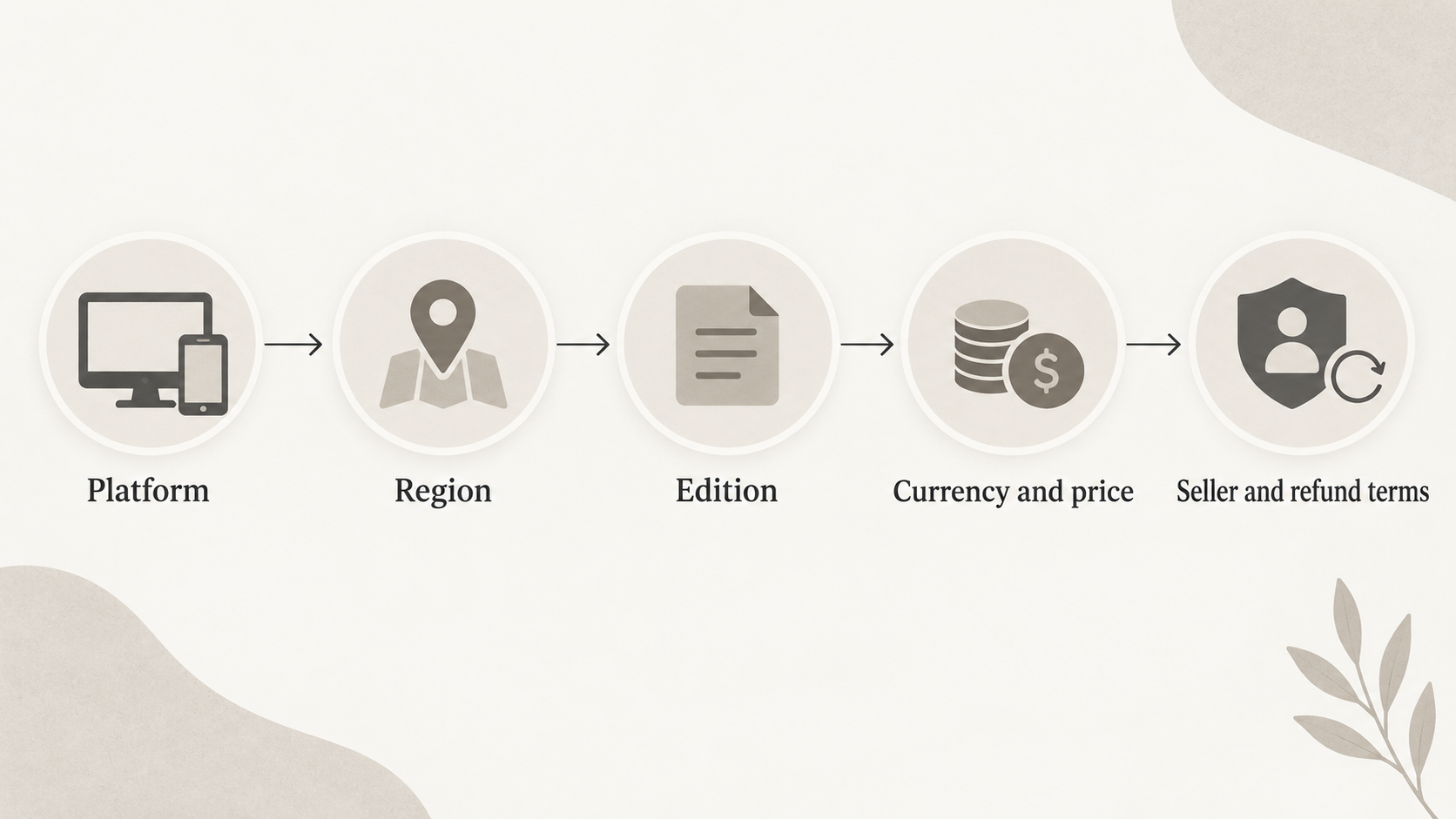
Run through these steps for any listing on Kinguin DE or any other key store:
- Confirm the platform and launcher. Check the product page for Steam, Epic, Battle.net or whichever launcher you use. See Platforms, Regions and Currencies.
- Check the region label. Compare tags such as RoW or Global against your account region.
- Identify the product type. Know whether you are buying a key, an account, a gift card or an in-game item, and what each delivers.
- Check the edition and price. Confirm the edition or DLC, the currency shown and the final price, not only the "from" figure.
- Read the terms. Go through the terms, the privacy policy and any refund or dispute information before paying. See Limitations and Gaps in the Public Information.
- Compare. Look at the same product across other sellers and the official store.
Frequently Asked Questions
What types of products can you buy on Kinguin DE?
The captured pages show game keys, gift cards (including Steam, Xbox, PSN, Roblox and Discord), prepaid cards, in-game items, game accounts, in-game currencies and game boosting. A Pro Tools category also appears in the navigation. Availability can change, so check the live site.
Which platforms does Kinguin support?
The platform filter lists Steam, Epic Games, Battle.net, Ubisoft, gog.com, MS Store, Rockstar Games, EA App, PlayStation 5 and 4, Xbox Series S|X, Xbox One, Nintendo, Meta Quest, Android and iOS. Whether a given listing works on your platform must be confirmed on its product page.
How do I know whether a key will work in my region?
Listings carry region labels such as RoW and Global. Compare the label with your account's region. The captured pages do not explain every restriction, so check the product page and Kinguin's own terms if you are unsure. See Platforms, Regions and Currencies.
Are the discounts shown on Kinguin real savings?
The discounts are the merchant's own labels. Sampled listings show -41% and -21%, and the homepage advertises up to 51% on selected items. The pages do not say what the reference price is. Compare the same product across other sellers and the official store before judging the saving.
What should I check before buying from Kinguin compared with other stores?
Check the platform, region label, edition and product type (key, account, gift card or in-game item). Check the final price and currency, and read Kinguin's terms and policies for refund and dispute details, which the sampled pages do not provide. Then compare the same product elsewhere. The full list is in the Checklist Before You Buy.
Sources
Editorial information: About our editorial team · Read our editorial policy · Read our affiliate disclosure.
Shop Kinguin DE Review: What the Storefront Offers and How It Compares with Alternatives →